Key Takeaways (TL;DR):
- The 90-Degree Myth: Sitting perfectly straight increases spinal disc pressure.
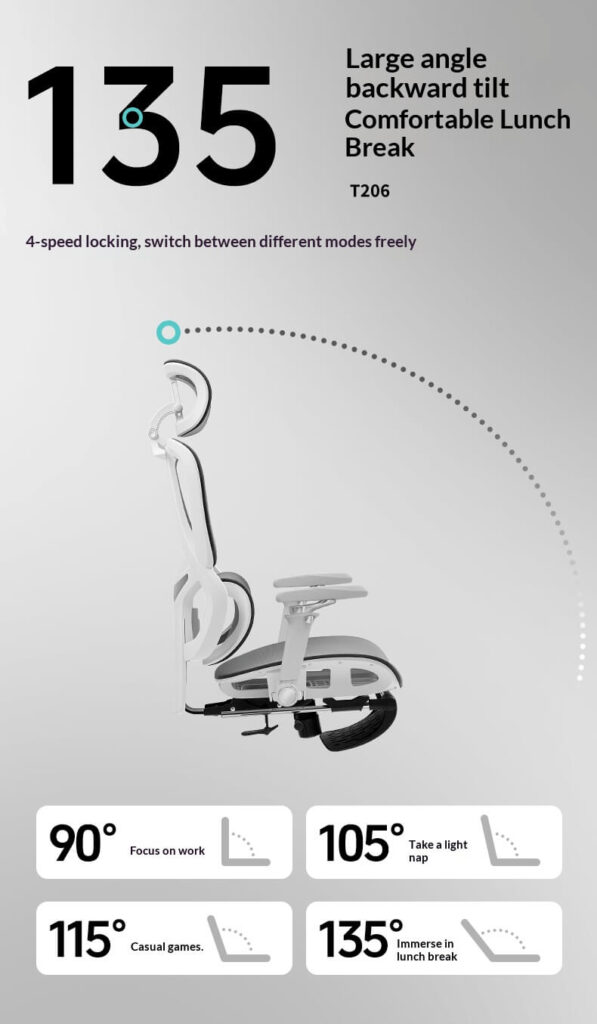
- The 135-Degree Rule: MRI studies show leaning back at a 135-degree angle is clinically the safest posture for your lower back.
- Must-Have Feature: Never buy a recliner chair without a “Synchro-Tilt” mechanism (where the back tilts further than the seat) to keep your feet flat.
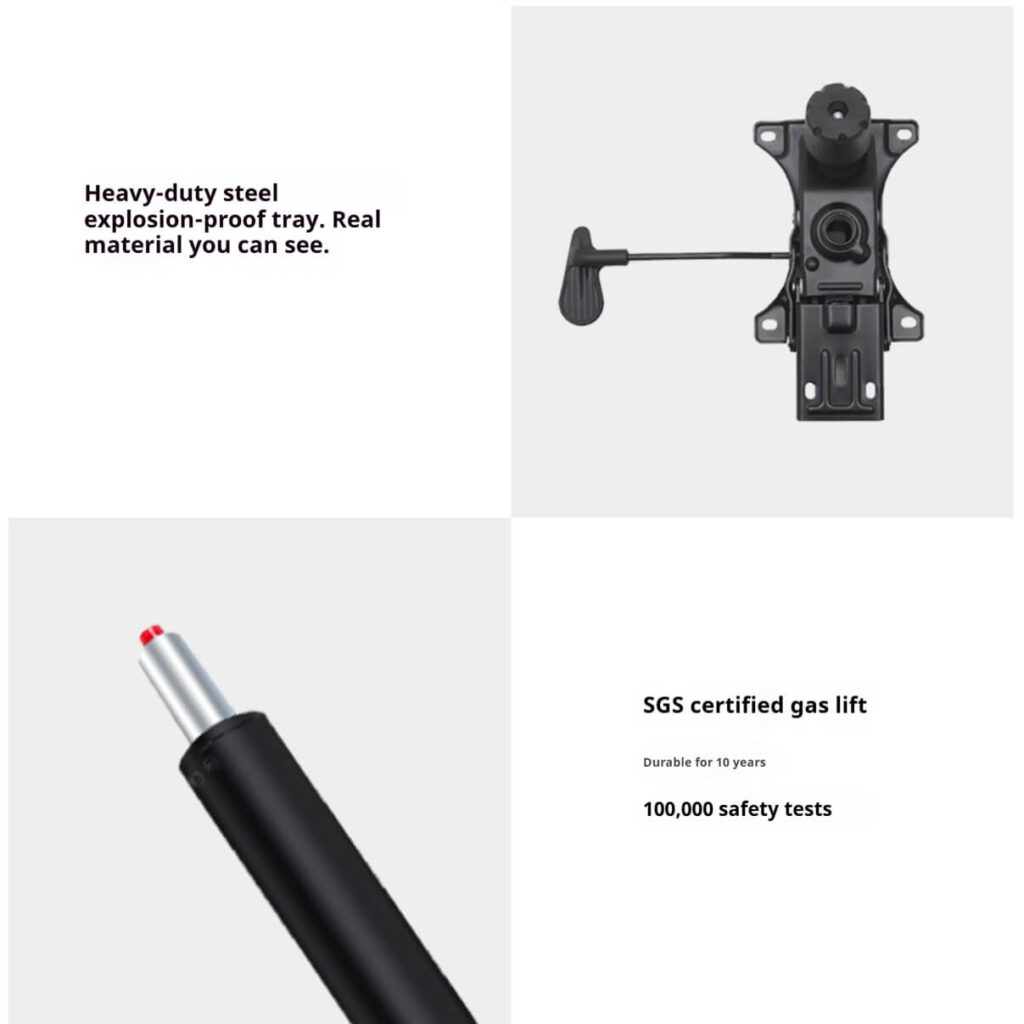
- Safety Warning: Reclining shifts your center of gravity. Ensure your chair has an SGS Class 4 gas cylinder to prevent tipping or breakage.
An evidence-based analysis of spinal disc decompression, synchro-tilt mechanics, and how to build a healthy reclined workstation.
Executive Summary: For decades, we were told to “sit up straight” at a 90-degree angle. However, modern biomechanical research proves that an upright posture places maximum stress on the lower back. This guide explores the clinical benefits of the ergonomic recliner chair for office use, separating medical-grade seating from living-room furniture, and providing a data-driven blueprint for a pain-free workspace.

I. The 90-Degree Myth vs. The 135-Degree Reality
When building a chair ergonomic office environment, the biggest misconception is the “perfect 90-degree posture.”
The Medical Evidence
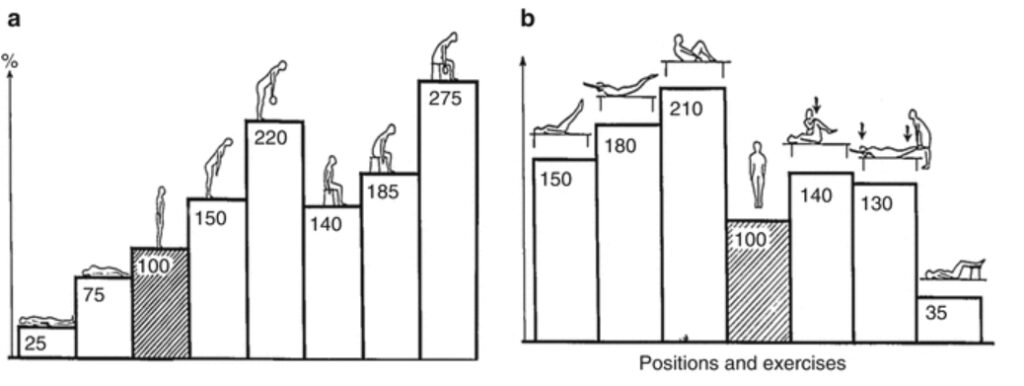
A landmark study presented at the Radiological Society of North America (RSNA) by Dr. Waseem Amir Bashir used whole-body positional MRI machines to track spinal disc movement in various sitting positions.
- The Findings: Sitting completely upright at 90 degrees places the highest amount of strain on the lumbar spine, actively squeezing the spinal discs out of alignment.
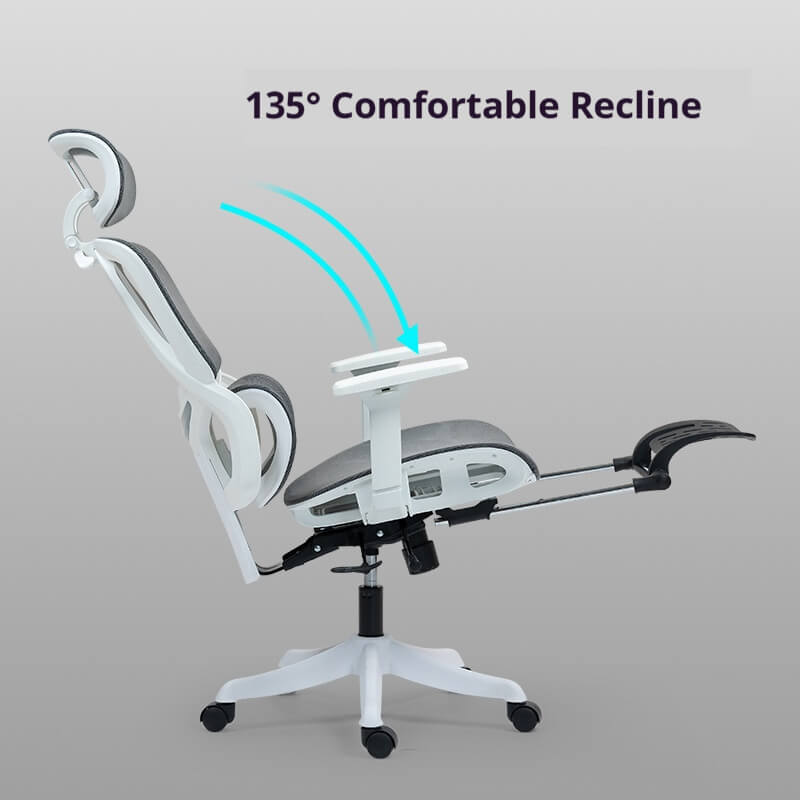
- The Solution: The MRI data revealed that sitting in a 135-degree reclined posture is the optimal biomechanical position. It significantly reduces intradiscal pressure, allowing the spine to rest in its natural shape while supporting the body’s weight.
Therefore, an ergonomic recliner chair is not a tool for “laziness”; it is a scientifically validated instrument for spinal preservation during long-duration cognitive tasks.
II. Anatomy of a True Ergonomic Recliner Chair
You cannot simply pull a living-room recliner up to a desk. To classify as a professional ergonomic computer chair, a recliner must feature specific industrial mechanics designed for active work.
1. The Synchro-Tilt Mechanism (The 2:1 Ratio)
If you search for an ergonomic chair Amazon listing, many cheap chairs feature a “center-tilt,” meaning the whole chair tips backward like a rocking chair, lifting your feet off the floor. This cuts off blood circulation to your legs.
- The Ergonomic Standard: A true ergonomic recliner chair utilizes a “Synchro-Tilt” mechanism. When you lean back, the backrest reclines at a 2-to-1 ratio compared to the seat pan. This allows your torso to open up to 135 degrees while your feet remain flat and stable on the floor.
2. Continuous Lumbar Tracking
When you recline, your spine shifts. A best rated ergonomic chair maintains constant contact with your L1-L5 vertebrae regardless of the recline angle. The lumbar support must adapt dynamically, ensuring the lower back’s natural curve (lordosis) never flattens out.
3. Mandatory Cervical Support (The Headrest)
According to the Canadian Centre for Occupational Health and Safety (CCOHS), a headrest is optional for upright typing, but absolutely mandatory for reclined working. If you lean back 135 degrees without a height-and-angle adjustable headrest, your neck muscles will strain to keep your eyes level with the monitor, leading to severe trapezius pain (Text Neck).
Our Lab Observation: > When we pressure-tested standard living-room recliners against the ergonomic computer chair standards, the difference was clear. In a standard recliner, the user’s pelvis tilts upward, disengaging the core. In our tests of BIFMA-compliant ergonomic recliners, the Synchro-Tilt mechanism maintained a precise 90-degree angle at the knees while the torso reclined, preserving active blood flow to the lower extremities even after 4 hours of continuous use.
III. How to Build a Reclined Workstation
An ergonomic recliner chair only works if the rest of your desk adapts to your posture. If you lean back but still have to reach forward to type, you defeat the purpose.
- The Monitor Arm: You must use an articulating monitor arm. When you recline, the monitor needs to be pulled closer to your face and tilted slightly downward so your gaze remains perpendicular to the screen without bending your neck.
- Negative-Tilt Keyboard Tray: OSHA (Occupational Safety and Health Administration) guidelines suggest that your wrists should remain straight. When reclining, a keyboard tray equipped with a “negative tilt” (angling downward away from you) matches the natural downward angle of your arms, preventing Carpal Tunnel Syndrome.
IV. The Danger of the “Budget Recliner”
Many consumers look for the best cheap ergonomic chair that can also recline. However, reclining completely changes the center of gravity and the weight distribution on the chair’s core components.
- Safety First: A reclined posture places immense torque on the gas lift and the wheelbase. According to BIFMA X5.1 testing standards, the chair must withstand a heavy rearward force without tipping or snapping.
- The Reality: Ultra-budget models often use Class 1 or 2 gas lifts and weak plastic bases. For safe reclining, especially in a professional setting, an SGS-certified Class 4 gas lift and an ADC12 Aluminum (or reinforced nylon) wheelbase are non-negotiable safety requirements.
V. FAQ: Reclining at Work
Q1: Is an ergonomic recliner chair appropriate for a professional office? A: Yes. The concept of “active sitting” involves changing postures throughout the day. Experts from Cornell University recommend breaking up the day: 90-100 degrees for high-speed typing, and 120-135 degrees for cognitive tasks like reading, video meetings, or brainstorming.
Q2: Will reclining make me sleepy or less productive? A: No, provided the chair is designed for “active reclining” rather than passive resting. Because an ergonomic mesh office chair breathes well and a synchro-tilt mechanism keeps your feet grounded, your blood circulation actually improves compared to static upright sitting, which can enhance cognitive endurance.
Q3: Can a gaming chair work as an ergonomic office recliner? A: Most racing-style gaming chairs offer deep recline functions, but they often lack independent lumbar depth adjustment and use flat backrests that force the shoulders inward. A dedicated ergonomic chair with lumbar support is always medically superior for 8-hour workdays.
VI. Official References & Clinical Evidence
To ensure the highest level of accuracy, the principles in this guide are sourced from:
- Radiological Society of North America (RSNA): Positional MRI Study of Spinal Disc Pressure (Dr. W.A. Bashir).
- OSHA (Occupational Safety and Health Administration): Computer Workstations eTool – Seating and Posture.
- Cornell University Human Factors and Ergonomics: Seating and Posture Guidelines (Dr. Alan Hedge).
- BIFMA: ANSI/BIFMA X5.1-2017 Safety and Performance Standards.
Disclaimer: This guide is based on biomechanical research and industrial standards. Individuals with pre-existing spinal conditions should consult a physical therapist before changing their primary work posture.
About the Author / Review Board: This guide was compiled by the Zechu Ergonomics Research Team. Our evaluations are strictly based on biomechanical data, BIFMA X5.1 industrial standards, and OSHA workplace guidelines. We do not accept payment for positive reviews, ensuring our seating recommendations remain 100% objective and data-driven.